
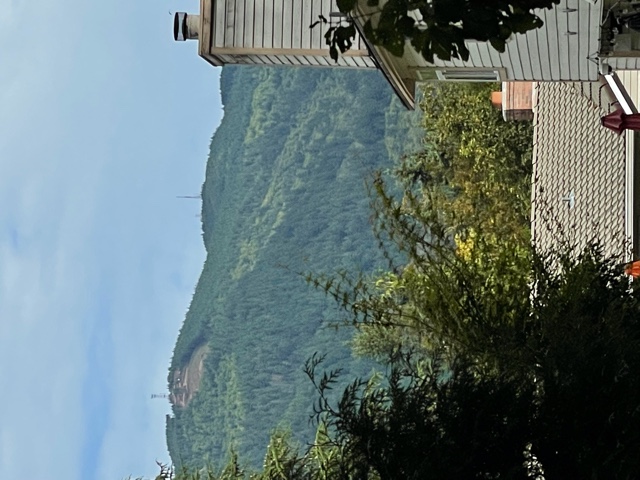
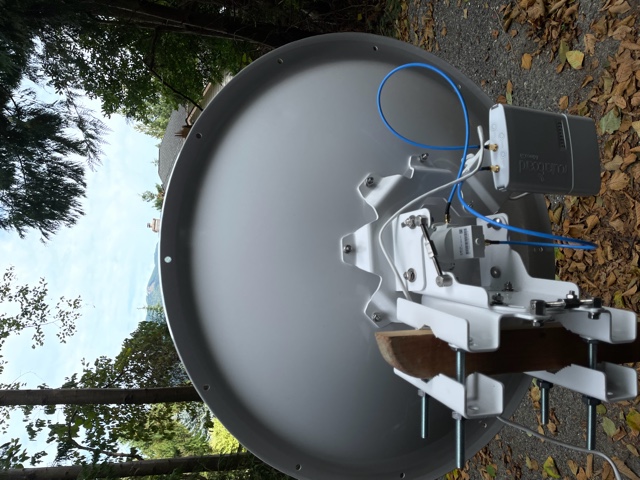
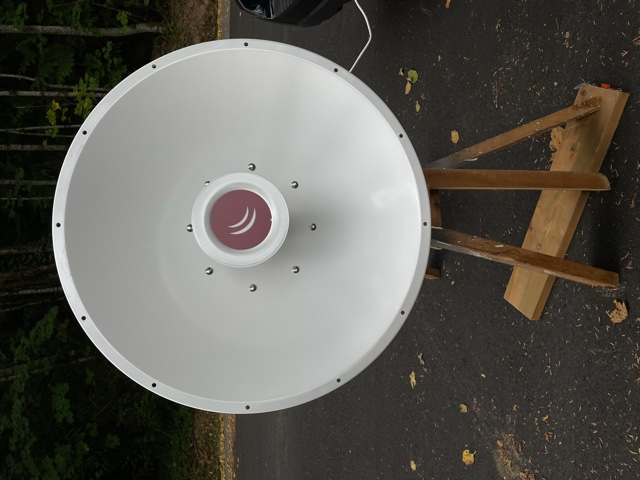
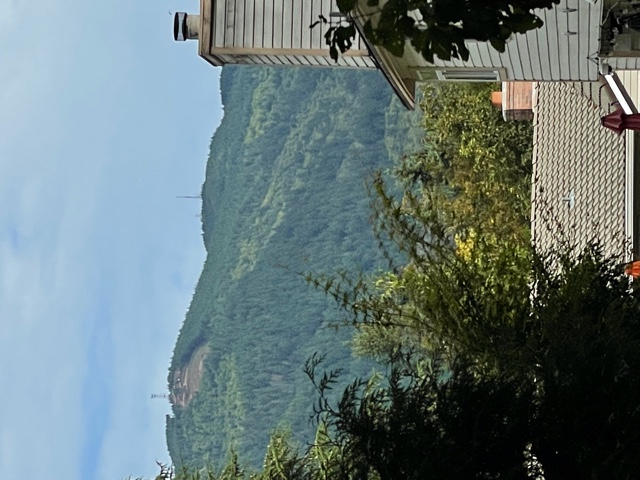
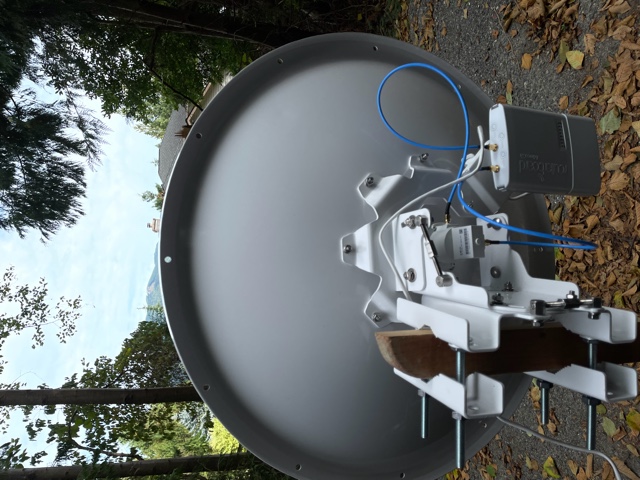
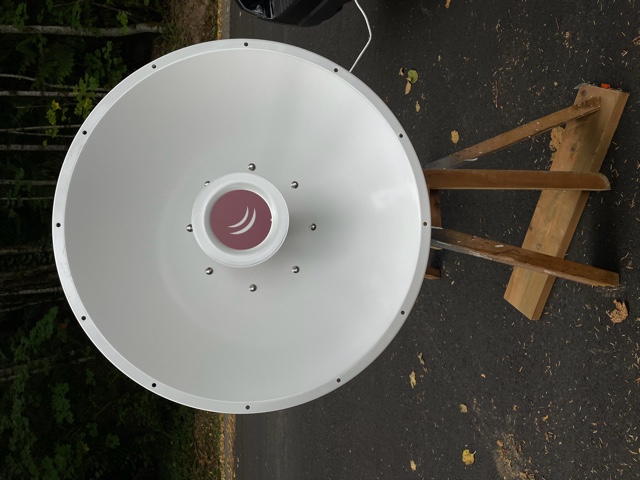
New install on Squak Mountain Issaquah and unable to find any signal on Tiger Mountain. I’m 3.5 miles away west and a little north of the tower on Tiger. Clear line of sight. Please validate with the tower picture attached. Installed the following: MikroTik mANT30 PA parabolic dish antenna 5GHz 30dBi MTAD-5G-30D3-PA Mikrotik BaseBox 5 RB912UAG-5HPnD-OUT 5GHz Outdoor Wireless AP Gigabit USB OSL4 Questions: Q1) Is the antenna tower on the right in the picture the right site? Q2) Is the dish assembled correctly? See picture. Q3) I was watching the signal strength on the routerboard while running "/interface wireless scan 0”. Nothing showed up on the terminal session and no signal strength LED’s lit up. I moved it left to right and adjusted azimuth each time I stopped. Q4) How long should you wait to acquire the signal between each time you move it? Q5) Is there anything like the signal strength tones aiming a DirecTV dish? Q6) Any other ideas. My exported configuration is below and I’ve successfully completed every step listed here: https://hamwan.org/Standards/Network%20Engineering/Client%20Node%20Configura... <https://hamwan.org/Standards/Network%20Engineering/Client%20Node%20Configuration.html> Thanks for your help! -Paul KK7AMW [admin@KK7AMW-Issaquah] > export # sep/08/2021 16:57:46 by RouterOS 6.48.4 # software id = H1Z0-P9F3 # # model = 912UAG-5HPnD /interface wireless set [ find default-name=wlan1 ] band=5ghz-onlyn country=no_country_set disabled=no frequency-mode=superchannel radio-name=KK7AMW/Issaquah-Tiger scan-list=HamWAN ssid=HamWAN \ wireless-protocol=nv2 /interface list add name=WAN add name=LAN /interface wireless channels add band=5ghz-onlyn comment="Cell sites radiate this at 0 degrees (north)" frequency=5920 list=HamWAN name=Sector1-5 width=5 add band=5ghz-onlyn comment="Cell sites radiate this at 120 degrees (south-east)" frequency=5900 list=HamWAN name=Sector2-5 width=5 add band=5ghz-onlyn comment="Cell sites radiate this at 240 degrees (south-west)" frequency=5880 list=HamWAN name=Sector3-5 width=5 add band=5ghz-onlyn comment="Cell sites radiate this at 0 degrees (north)" frequency=5920 list=HamWAN name=Sector1-10 width=10 add band=5ghz-onlyn comment="Cell sites radiate this at 120 degrees (south-east)" frequency=5900 list=HamWAN name=Sector2-10 width=10 add band=5ghz-onlyn comment="Cell sites radiate this at 240 degrees (south-west)" frequency=5880 list=HamWAN name=Sector3-10 width=10 /interface wireless security-profiles set [ find default=yes ] supplicant-identity=MikroTik /snmp community set [ find default=yes ] addresses=44.24.240.0/20 name=hamwan /system logging action set 3 remote=44.24.244.8 /interface list member add interface=wlan1 list=WAN add list=LAN /ip address add address=192.168.86.53/24 interface=ether1 network=192.168.86.0 /ip dhcp-client add disabled=no interface=wlan1 /ip dns set servers=192.168.86.9 /ip firewall mangle add action=change-mss chain=output new-mss=1378 protocol=tcp tcp-flags=syn tcp-mss=!0-1378 add action=change-mss chain=forward new-mss=1378 protocol=tcp tcp-flags=syn tcp-mss=!0-1378 /ip route add distance=1 gateway=192.168.86.1 /ip service set telnet disabled=yes set ftp disabled=yes set www disabled=yes set ssh port=222 set api disabled=yes set api-ssl disabled=yes /snmp set contact="#HamWAN-Support on irc.freenode.org" enabled=yes location=47.516944,-122.0452 /system clock set time-zone-name=America/Los_Angeles /system identity set name=KK7AMW-Issaquah /system logging add action=remote topics=info add action=remote topics=warning add action=remote topics=error /system ntp client set enabled=yes primary-ntp=44.24.244.4 secondary-ntp=44.24.245.4 /system routerboard settings set boot-device=try-ethernet-once-then-nand [admin@KK7AMW-Issaquah] >

Have you tried /interface wireless scan 0 It should show Hamwan results unless you have an error in your config. Most people are jealous of your Line of sight. This setup is going to work great for you. You are almost there. Dylan Ambauen KI7SBI On Sat, Sep 11, 2021, 16:58 Paul Sundquist <psundquist@foxhill.org> wrote:
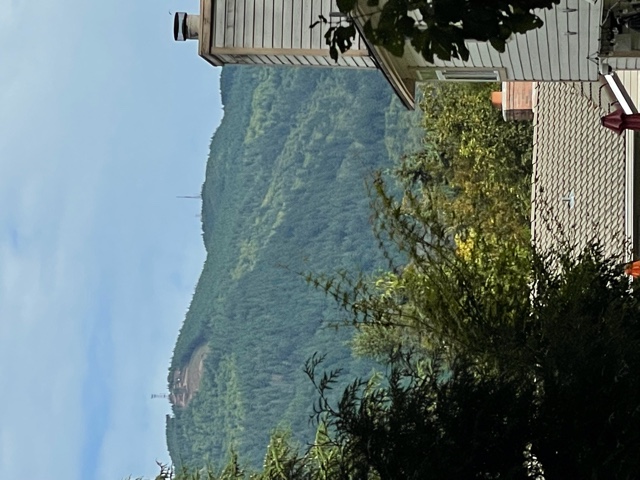
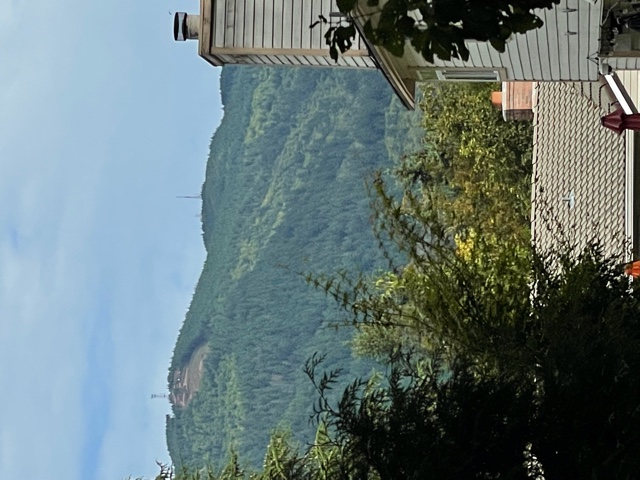
New install on Squak Mountain Issaquah and unable to find any signal on Tiger Mountain. I’m 3.5 miles away west and a little north of the tower on Tiger. Clear line of sight. Please validate with the tower picture attached.
Installed the following: MikroTik mANT30 PA parabolic dish antenna 5GHz 30dBi MTAD-5G-30D3-PA Mikrotik BaseBox 5 RB912UAG-5HPnD-OUT 5GHz Outdoor Wireless AP Gigabit USB OSL4
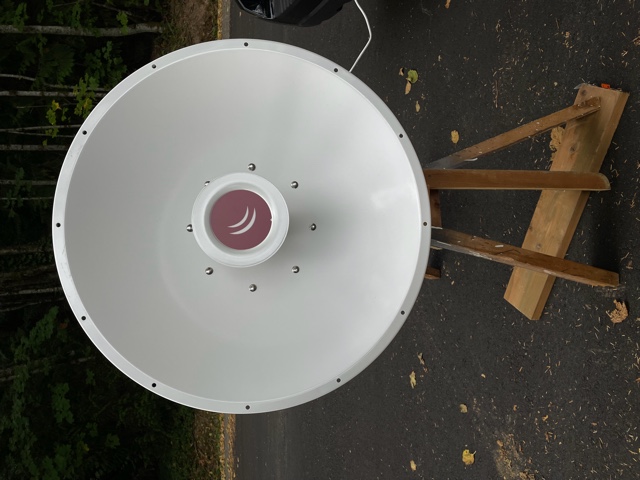
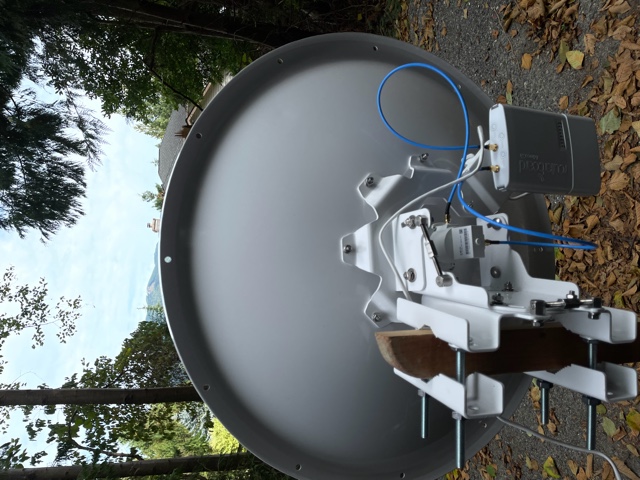
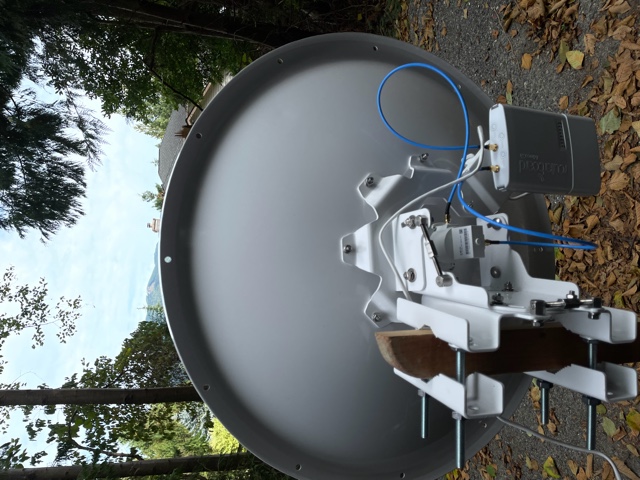
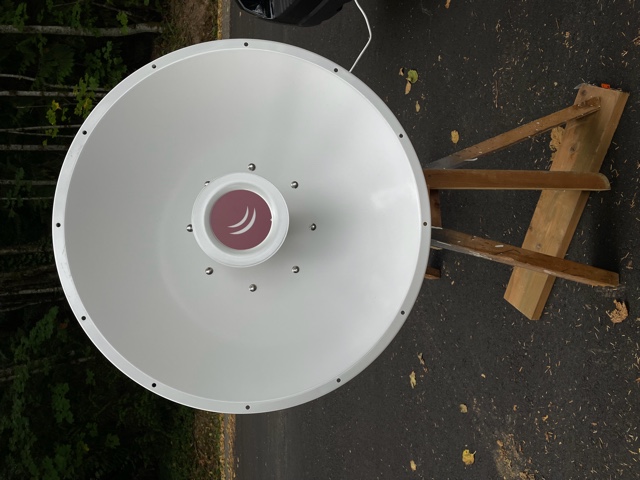
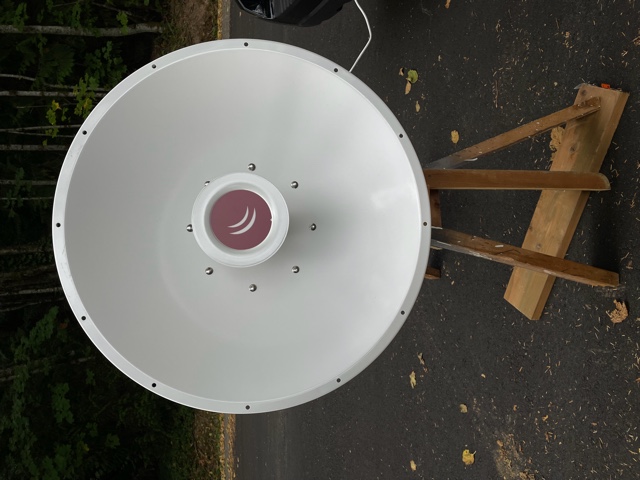
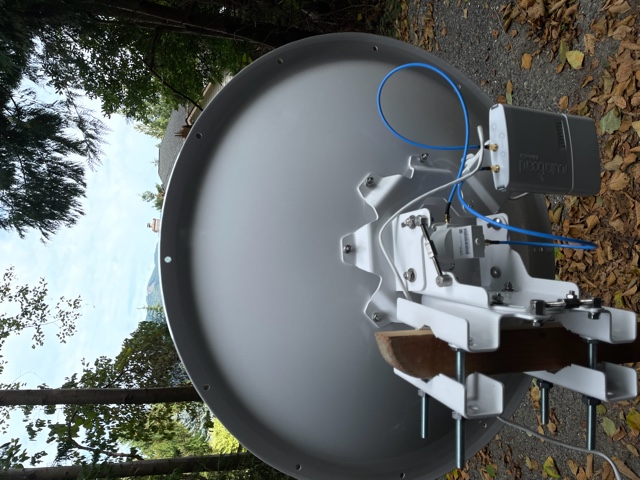
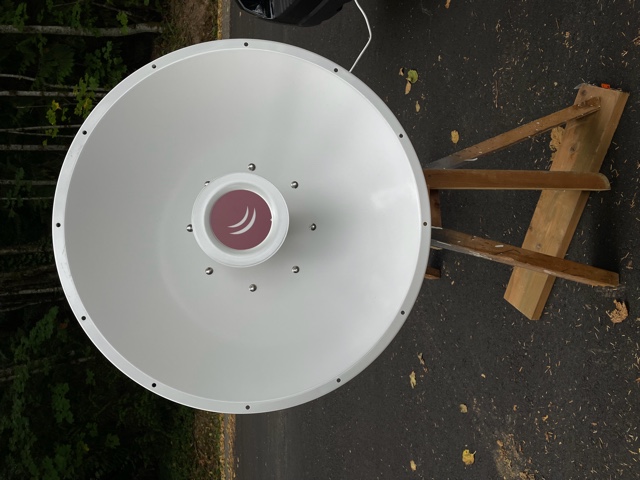
Questions: Q1) Is the antenna tower on the right in the picture the right site? Q2) Is the dish assembled correctly? See picture. Q3) I was watching the signal strength on the routerboard while running "/interface wireless scan 0”. Nothing showed up on the terminal session and no signal strength LED’s lit up. I moved it left to right and adjusted azimuth each time I stopped. Q4) How long should you wait to acquire the signal between each time you move it? Q5) Is there anything like the signal strength tones aiming a DirecTV dish? Q6) Any other ideas. My exported configuration is below and I’ve successfully completed every step listed here: https://hamwan.org/Standards/Network%20Engineering/Client%20Node%20Configura...
Thanks for your help! -Paul KK7AMW
[admin@KK7AMW-Issaquah] > export # sep/08/2021 16:57:46 by RouterOS 6.48.4 # software id = H1Z0-P9F3 # # model = 912UAG-5HPnD
/interface wireless set [ find default-name=wlan1 ] band=5ghz-onlyn country=no_country_set disabled=no frequency-mode=superchannel radio-name=KK7AMW/Issaquah-Tiger scan-list=HamWAN ssid=HamWAN \ wireless-protocol=nv2 /interface list add name=WAN add name=LAN /interface wireless channels add band=5ghz-onlyn comment="Cell sites radiate this at 0 degrees (north)" frequency=5920 list=HamWAN name=Sector1-5 width=5 add band=5ghz-onlyn comment="Cell sites radiate this at 120 degrees (south-east)" frequency=5900 list=HamWAN name=Sector2-5 width=5 add band=5ghz-onlyn comment="Cell sites radiate this at 240 degrees (south-west)" frequency=5880 list=HamWAN name=Sector3-5 width=5 add band=5ghz-onlyn comment="Cell sites radiate this at 0 degrees (north)" frequency=5920 list=HamWAN name=Sector1-10 width=10 add band=5ghz-onlyn comment="Cell sites radiate this at 120 degrees (south-east)" frequency=5900 list=HamWAN name=Sector2-10 width=10 add band=5ghz-onlyn comment="Cell sites radiate this at 240 degrees (south-west)" frequency=5880 list=HamWAN name=Sector3-10 width=10 /interface wireless security-profiles set [ find default=yes ] supplicant-identity=MikroTik /snmp community set [ find default=yes ] addresses=44.24.240.0/20 name=hamwan /system logging action set 3 remote=44.24.244.8 /interface list member add interface=wlan1 list=WAN add list=LAN /ip address add address=192.168.86.53/24 interface=ether1 network=192.168.86.0 /ip dhcp-client add disabled=no interface=wlan1 /ip dns set servers=192.168.86.9 /ip firewall mangle add action=change-mss chain=output new-mss=1378 protocol=tcp tcp-flags=syn tcp-mss=!0-1378 add action=change-mss chain=forward new-mss=1378 protocol=tcp tcp-flags=syn tcp-mss=!0-1378 /ip route add distance=1 gateway=192.168.86.1 /ip service set telnet disabled=yes set ftp disabled=yes set www disabled=yes set ssh port=222 set api disabled=yes set api-ssl disabled=yes /snmp set contact="#HamWAN-Support on irc.freenode.org" enabled=yes location=47.516944,-122.0452 /system clock set time-zone-name=America/Los_Angeles /system identity set name=KK7AMW-Issaquah /system logging add action=remote topics=info add action=remote topics=warning add action=remote topics=error /system ntp client set enabled=yes primary-ntp=44.24.244.4 secondary-ntp=44.24.245.4 /system routerboard settings set boot-device=try-ethernet-once-then-nand [admin@KK7AMW-Issaquah] >
_______________________________________________ PSDR mailing list PSDR@hamwan.org http://mail.hamwan.net/mailman/listinfo/psdr
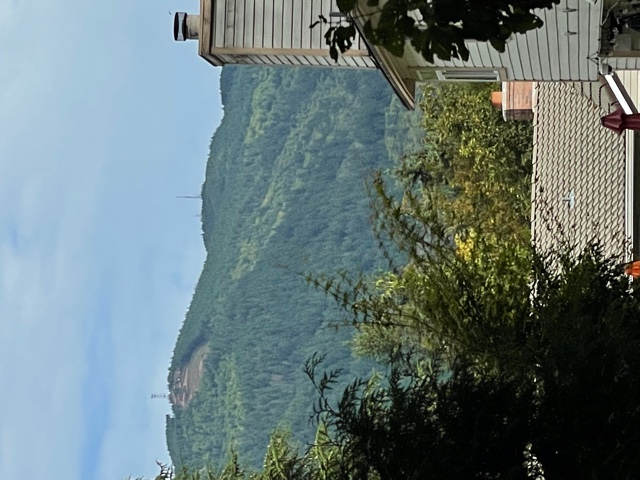
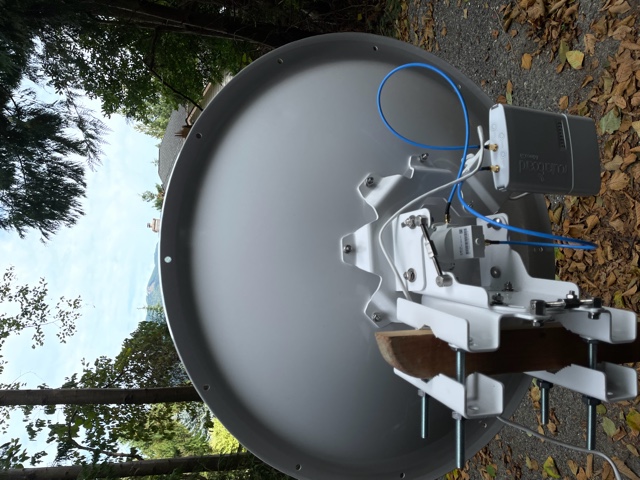
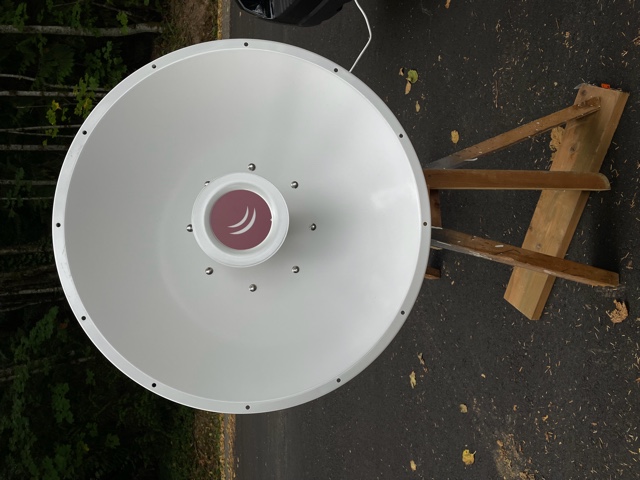
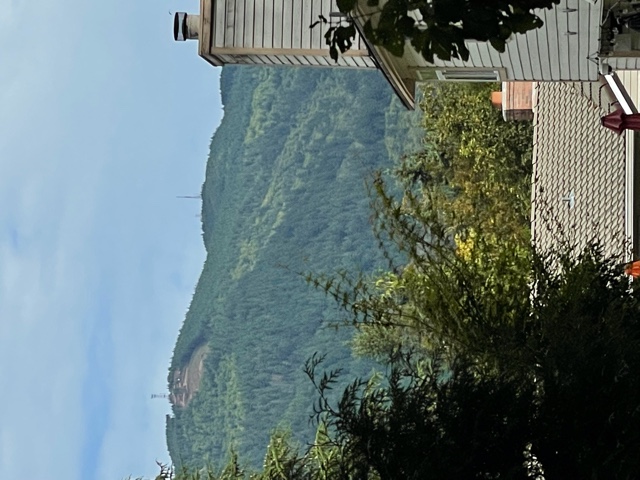
Thanks for the encouragement! I may have some tree issues from my roof to hit Tiger. The picture is from my neighbor who has a great view. I thought it would be an easier starting point. I was running the scan command and received no results. Going to try Haystack next, seems like I have a good view of it from my roof. On Sat, Sep 11, 2021 at 7:07 PM Dylan Ambauen <dylan@ambauen.com> wrote:
Have you tried
/interface wireless scan 0
It should show Hamwan results unless you have an error in your config. Most people are jealous of your Line of sight. This setup is going to work great for you. You are almost there.
Dylan Ambauen KI7SBI
On Sat, Sep 11, 2021, 16:58 Paul Sundquist <psundquist@foxhill.org> wrote:
New install on Squak Mountain Issaquah and unable to find any signal on Tiger Mountain. I’m 3.5 miles away west and a little north of the tower on Tiger. Clear line of sight. Please validate with the tower picture attached.
Installed the following: MikroTik mANT30 PA parabolic dish antenna 5GHz 30dBi MTAD-5G-30D3-PA Mikrotik BaseBox 5 RB912UAG-5HPnD-OUT 5GHz Outdoor Wireless AP Gigabit USB OSL4
Questions: Q1) Is the antenna tower on the right in the picture the right site? Q2) Is the dish assembled correctly? See picture. Q3) I was watching the signal strength on the routerboard while running "/interface wireless scan 0”. Nothing showed up on the terminal session and no signal strength LED’s lit up. I moved it left to right and adjusted azimuth each time I stopped. Q4) How long should you wait to acquire the signal between each time you move it? Q5) Is there anything like the signal strength tones aiming a DirecTV dish? Q6) Any other ideas. My exported configuration is below and I’ve successfully completed every step listed here: https://hamwan.org/Standards/Network%20Engineering/Client%20Node%20Configura...
Thanks for your help! -Paul KK7AMW
[admin@KK7AMW-Issaquah] > export # sep/08/2021 16:57:46 by RouterOS 6.48.4 # software id = H1Z0-P9F3 # # model = 912UAG-5HPnD
/interface wireless set [ find default-name=wlan1 ] band=5ghz-onlyn country=no_country_set disabled=no frequency-mode=superchannel radio-name=KK7AMW/Issaquah-Tiger scan-list=HamWAN ssid=HamWAN \ wireless-protocol=nv2 /interface list add name=WAN add name=LAN /interface wireless channels add band=5ghz-onlyn comment="Cell sites radiate this at 0 degrees (north)" frequency=5920 list=HamWAN name=Sector1-5 width=5 add band=5ghz-onlyn comment="Cell sites radiate this at 120 degrees (south-east)" frequency=5900 list=HamWAN name=Sector2-5 width=5 add band=5ghz-onlyn comment="Cell sites radiate this at 240 degrees (south-west)" frequency=5880 list=HamWAN name=Sector3-5 width=5 add band=5ghz-onlyn comment="Cell sites radiate this at 0 degrees (north)" frequency=5920 list=HamWAN name=Sector1-10 width=10 add band=5ghz-onlyn comment="Cell sites radiate this at 120 degrees (south-east)" frequency=5900 list=HamWAN name=Sector2-10 width=10 add band=5ghz-onlyn comment="Cell sites radiate this at 240 degrees (south-west)" frequency=5880 list=HamWAN name=Sector3-10 width=10 /interface wireless security-profiles set [ find default=yes ] supplicant-identity=MikroTik /snmp community set [ find default=yes ] addresses=44.24.240.0/20 name=hamwan /system logging action set 3 remote=44.24.244.8 /interface list member add interface=wlan1 list=WAN add list=LAN /ip address add address=192.168.86.53/24 interface=ether1 network=192.168.86.0 /ip dhcp-client add disabled=no interface=wlan1 /ip dns set servers=192.168.86.9 /ip firewall mangle add action=change-mss chain=output new-mss=1378 protocol=tcp tcp-flags=syn tcp-mss=!0-1378 add action=change-mss chain=forward new-mss=1378 protocol=tcp tcp-flags=syn tcp-mss=!0-1378 /ip route add distance=1 gateway=192.168.86.1 /ip service set telnet disabled=yes set ftp disabled=yes set www disabled=yes set ssh port=222 set api disabled=yes set api-ssl disabled=yes /snmp set contact="#HamWAN-Support on irc.freenode.org" enabled=yes location=47.516944,-122.0452 /system clock set time-zone-name=America/Los_Angeles /system identity set name=KK7AMW-Issaquah /system logging add action=remote topics=info add action=remote topics=warning add action=remote topics=error /system ntp client set enabled=yes primary-ntp=44.24.244.4 secondary-ntp=44.24.245.4 /system routerboard settings set boot-device=try-ethernet-once-then-nand [admin@KK7AMW-Issaquah] >
_______________________________________________ PSDR mailing list PSDR@hamwan.org http://mail.hamwan.net/mailman/listinfo/psdr
_______________________________________________ PSDR mailing list PSDR@hamwan.org http://mail.hamwan.net/mailman/listinfo/psdr

I'm not sure what's going wrong, but I can verify that S3.ETiger is running and has 5 clients connected to it. I suspect you might be aiming at the towers on west tiger (47.508761°, -121.984954°) and (47.504856°, -121.971615°) whereas the HamWAN site is on east tiger (47.488172°, -121.946733°). From your picture, you should see a 3rd tower or cluster of towers further towards the right, if that is the case. Google Earth is a good tool to get a sense of the visuals, since it lets you tilt the world. --Bart On 9/11/2021 4:58 PM, Paul Sundquist wrote:
New install on Squak Mountain Issaquah and unable to find any signal on Tiger Mountain. I’m 3.5 miles away west and a little north of the tower on Tiger. Clear line of sight. Please validate with the tower picture attached.
Installed the following: MikroTik mANT30 PA parabolic dish antenna 5GHz 30dBi MTAD-5G-30D3-PA Mikrotik BaseBox 5 RB912UAG-5HPnD-OUT 5GHz Outdoor Wireless AP Gigabit USB OSL4
Questions: Q1) Is the antenna tower on the right in the picture the right site? Q2) Is the dish assembled correctly? See picture. Q3) I was watching the signal strength on the routerboard while running "/interface wireless scan 0”. Nothing showed up on the terminal session and no signal strength LED’s lit up. I moved it left to right and adjusted azimuth each time I stopped. Q4) How long should you wait to acquire the signal between each time you move it? Q5) Is there anything like the signal strength tones aiming a DirecTV dish? Q6) Any other ideas. My exported configuration is below and I’ve successfully completed every step listed here: https://hamwan.org/Standards/Network%20Engineering/Client%20Node%20Configura... <https://hamwan.org/Standards/Network Engineering/Client Node Configuration.html>
Thanks for your help! -Paul KK7AMW
[admin@KK7AMW-Issaquah] > export # sep/08/2021 16:57:46 by RouterOS 6.48.4 # software id = H1Z0-P9F3 # # model = 912UAG-5HPnD
/interface wireless set [ find default-name=wlan1 ] band=5ghz-onlyn country=no_country_set disabled=no frequency-mode=superchannel radio-name=KK7AMW/Issaquah-Tiger scan-list=HamWAN ssid=HamWAN \ wireless-protocol=nv2 /interface list add name=WAN add name=LAN /interface wireless channels add band=5ghz-onlyn comment="Cell sites radiate this at 0 degrees (north)" frequency=5920 list=HamWAN name=Sector1-5 width=5 add band=5ghz-onlyn comment="Cell sites radiate this at 120 degrees (south-east)" frequency=5900 list=HamWAN name=Sector2-5 width=5 add band=5ghz-onlyn comment="Cell sites radiate this at 240 degrees (south-west)" frequency=5880 list=HamWAN name=Sector3-5 width=5 add band=5ghz-onlyn comment="Cell sites radiate this at 0 degrees (north)" frequency=5920 list=HamWAN name=Sector1-10 width=10 add band=5ghz-onlyn comment="Cell sites radiate this at 120 degrees (south-east)" frequency=5900 list=HamWAN name=Sector2-10 width=10 add band=5ghz-onlyn comment="Cell sites radiate this at 240 degrees (south-west)" frequency=5880 list=HamWAN name=Sector3-10 width=10 /interface wireless security-profiles set [ find default=yes ] supplicant-identity=MikroTik /snmp community set [ find default=yes ] addresses=44.24.240.0/20 name=hamwan /system logging action set 3 remote=44.24.244.8 /interface list member add interface=wlan1 list=WAN add list=LAN /ip address add address=192.168.86.53/24 interface=ether1 network=192.168.86.0 /ip dhcp-client add disabled=no interface=wlan1 /ip dns set servers=192.168.86.9 /ip firewall mangle add action=change-mss chain=output new-mss=1378 protocol=tcp tcp-flags=syn tcp-mss=!0-1378 add action=change-mss chain=forward new-mss=1378 protocol=tcp tcp-flags=syn tcp-mss=!0-1378 /ip route add distance=1 gateway=192.168.86.1 /ip service set telnet disabled=yes set ftp disabled=yes set www disabled=yes set ssh port=222 set api disabled=yes set api-ssl disabled=yes /snmp set contact="#HamWAN-Support on irc.freenode.org <http://irc.freenode.org>" enabled=yes location=47.516944,-122.0452 /system clock set time-zone-name=America/Los_Angeles /system identity set name=KK7AMW-Issaquah /system logging add action=remote topics=info add action=remote topics=warning add action=remote topics=error /system ntp client set enabled=yes primary-ntp=44.24.244.4 secondary-ntp=44.24.245.4 /system routerboard settings set boot-device=try-ethernet-once-then-nand [admin@KK7AMW-Issaquah] >
_______________________________________________ PSDR mailing list PSDR@hamwan.org http://mail.hamwan.net/mailman/listinfo/psdr
If your GPS data is correct, you may also want to try a shot to Haystack. It looks possibly unobstructed to you. --Bart On 9/11/2021 10:54 PM, Bart Kus wrote:
I'm not sure what's going wrong, but I can verify that S3.ETiger is running and has 5 clients connected to it. I suspect you might be aiming at the towers on west tiger (47.508761°, -121.984954°) and (47.504856°, -121.971615°) whereas the HamWAN site is on east tiger (47.488172°, -121.946733°). From your picture, you should see a 3rd tower or cluster of towers further towards the right, if that is the case. Google Earth is a good tool to get a sense of the visuals, since it lets you tilt the world.
--Bart
On 9/11/2021 4:58 PM, Paul Sundquist wrote:
New install on Squak Mountain Issaquah and unable to find any signal on Tiger Mountain. I’m 3.5 miles away west and a little north of the tower on Tiger. Clear line of sight. Please validate with the tower picture attached.
Installed the following: MikroTik mANT30 PA parabolic dish antenna 5GHz 30dBi MTAD-5G-30D3-PA Mikrotik BaseBox 5 RB912UAG-5HPnD-OUT 5GHz Outdoor Wireless AP Gigabit USB OSL4
Questions: Q1) Is the antenna tower on the right in the picture the right site? Q2) Is the dish assembled correctly? See picture. Q3) I was watching the signal strength on the routerboard while running "/interface wireless scan 0”. Nothing showed up on the terminal session and no signal strength LED’s lit up. I moved it left to right and adjusted azimuth each time I stopped. Q4) How long should you wait to acquire the signal between each time you move it? Q5) Is there anything like the signal strength tones aiming a DirecTV dish? Q6) Any other ideas. My exported configuration is below and I’ve successfully completed every step listed here: https://hamwan.org/Standards/Network%20Engineering/Client%20Node%20Configura... <https://hamwan.org/Standards/Network Engineering/Client Node Configuration.html>
Thanks for your help! -Paul KK7AMW
[admin@KK7AMW-Issaquah] > export # sep/08/2021 16:57:46 by RouterOS 6.48.4 # software id = H1Z0-P9F3 # # model = 912UAG-5HPnD
/interface wireless set [ find default-name=wlan1 ] band=5ghz-onlyn country=no_country_set disabled=no frequency-mode=superchannel radio-name=KK7AMW/Issaquah-Tiger scan-list=HamWAN ssid=HamWAN \ wireless-protocol=nv2 /interface list add name=WAN add name=LAN /interface wireless channels add band=5ghz-onlyn comment="Cell sites radiate this at 0 degrees (north)" frequency=5920 list=HamWAN name=Sector1-5 width=5 add band=5ghz-onlyn comment="Cell sites radiate this at 120 degrees (south-east)" frequency=5900 list=HamWAN name=Sector2-5 width=5 add band=5ghz-onlyn comment="Cell sites radiate this at 240 degrees (south-west)" frequency=5880 list=HamWAN name=Sector3-5 width=5 add band=5ghz-onlyn comment="Cell sites radiate this at 0 degrees (north)" frequency=5920 list=HamWAN name=Sector1-10 width=10 add band=5ghz-onlyn comment="Cell sites radiate this at 120 degrees (south-east)" frequency=5900 list=HamWAN name=Sector2-10 width=10 add band=5ghz-onlyn comment="Cell sites radiate this at 240 degrees (south-west)" frequency=5880 list=HamWAN name=Sector3-10 width=10 /interface wireless security-profiles set [ find default=yes ] supplicant-identity=MikroTik /snmp community set [ find default=yes ] addresses=44.24.240.0/20 name=hamwan /system logging action set 3 remote=44.24.244.8 /interface list member add interface=wlan1 list=WAN add list=LAN /ip address add address=192.168.86.53/24 interface=ether1 network=192.168.86.0 /ip dhcp-client add disabled=no interface=wlan1 /ip dns set servers=192.168.86.9 /ip firewall mangle add action=change-mss chain=output new-mss=1378 protocol=tcp tcp-flags=syn tcp-mss=!0-1378 add action=change-mss chain=forward new-mss=1378 protocol=tcp tcp-flags=syn tcp-mss=!0-1378 /ip route add distance=1 gateway=192.168.86.1 /ip service set telnet disabled=yes set ftp disabled=yes set www disabled=yes set ssh port=222 set api disabled=yes set api-ssl disabled=yes /snmp set contact="#HamWAN-Support on irc.freenode.org <http://irc.freenode.org>" enabled=yes location=47.516944,-122.0452 /system clock set time-zone-name=America/Los_Angeles /system identity set name=KK7AMW-Issaquah /system logging add action=remote topics=info add action=remote topics=warning add action=remote topics=error /system ntp client set enabled=yes primary-ntp=44.24.244.4 secondary-ntp=44.24.245.4 /system routerboard settings set boot-device=try-ethernet-once-then-nand [admin@KK7AMW-Issaquah] >
_______________________________________________ PSDR mailing list PSDR@hamwan.org http://mail.hamwan.net/mailman/listinfo/psdr
_______________________________________________ PSDR mailing list PSDR@hamwan.org http://mail.hamwan.net/mailman/listinfo/psdr
Haystack was my plan B when I ordered the equipment. I spent a lot of time looking towards Haystack with my binoculars and may have a clear shot from my roof. Visually it appears I can see the gap where Index, WA is located. I can see a valley by observing the mountains on the north side. Further in the distance I can see a glaciated mountain - potentially Glacier Peak. Do you have the Haystack GPS coordinates? I’ll try aiming it at Haystack next. Thanks for your advise. Didn’t expect to learn so much about the mountains visible from my house with this endeavor. -Paul On Sat, Sep 11, 2021 at 10:57 PM Bart Kus <me@bartk.us> wrote:
If your GPS data is correct, you may also want to try a shot to Haystack. It looks possibly unobstructed to you.
--Bart
On 9/11/2021 10:54 PM, Bart Kus wrote:
I'm not sure what's going wrong, but I can verify that S3.ETiger is running and has 5 clients connected to it. I suspect you might be aiming at the towers on west tiger (47.508761°, -121.984954°) and (47.504856°, -121.971615°) whereas the HamWAN site is on east tiger (47.488172°, -121.946733°). From your picture, you should see a 3rd tower or cluster of towers further towards the right, if that is the case. Google Earth is a good tool to get a sense of the visuals, since it lets you tilt the world.
--Bart
On 9/11/2021 4:58 PM, Paul Sundquist wrote:
New install on Squak Mountain Issaquah and unable to find any signal on Tiger Mountain. I’m 3.5 miles away west and a little north of the tower on Tiger. Clear line of sight. Please validate with the tower picture attached.
Installed the following: MikroTik mANT30 PA parabolic dish antenna 5GHz 30dBi MTAD-5G-30D3-PA Mikrotik BaseBox 5 RB912UAG-5HPnD-OUT 5GHz Outdoor Wireless AP Gigabit USB OSL4
Questions: Q1) Is the antenna tower on the right in the picture the right site? Q2) Is the dish assembled correctly? See picture. Q3) I was watching the signal strength on the routerboard while running "/interface wireless scan 0”. Nothing showed up on the terminal session and no signal strength LED’s lit up. I moved it left to right and adjusted azimuth each time I stopped. Q4) How long should you wait to acquire the signal between each time you move it? Q5) Is there anything like the signal strength tones aiming a DirecTV dish? Q6) Any other ideas. My exported configuration is below and I’ve successfully completed every step listed here: https://hamwan.org/Standards/Network%20Engineering/Client%20Node%20Configura... <https://hamwan.org/Standards/Network%0D%20%20%20%20%20%20%20%20%20%20%20%20%20%20Engineering/Client%20Node%20Configuration.html>
Thanks for your help! -Paul KK7AMW
[admin@KK7AMW-Issaquah] > export # sep/08/2021 16:57:46 by RouterOS 6.48.4 # software id = H1Z0-P9F3 # # model = 912UAG-5HPnD
/interface wireless set [ find default-name=wlan1 ] band=5ghz-onlyn country=no_country_set disabled=no frequency-mode=superchannel radio-name=KK7AMW/Issaquah-Tiger scan-list=HamWAN ssid=HamWAN \ wireless-protocol=nv2 /interface list add name=WAN add name=LAN /interface wireless channels add band=5ghz-onlyn comment="Cell sites radiate this at 0 degrees (north)" frequency=5920 list=HamWAN name=Sector1-5 width=5 add band=5ghz-onlyn comment="Cell sites radiate this at 120 degrees (south-east)" frequency=5900 list=HamWAN name=Sector2-5 width=5 add band=5ghz-onlyn comment="Cell sites radiate this at 240 degrees (south-west)" frequency=5880 list=HamWAN name=Sector3-5 width=5 add band=5ghz-onlyn comment="Cell sites radiate this at 0 degrees (north)" frequency=5920 list=HamWAN name=Sector1-10 width=10 add band=5ghz-onlyn comment="Cell sites radiate this at 120 degrees (south-east)" frequency=5900 list=HamWAN name=Sector2-10 width=10 add band=5ghz-onlyn comment="Cell sites radiate this at 240 degrees (south-west)" frequency=5880 list=HamWAN name=Sector3-10 width=10 /interface wireless security-profiles set [ find default=yes ] supplicant-identity=MikroTik /snmp community set [ find default=yes ] addresses=44.24.240.0/20 name=hamwan /system logging action set 3 remote=44.24.244.8 /interface list member add interface=wlan1 list=WAN add list=LAN /ip address add address=192.168.86.53/24 interface=ether1 network=192.168.86.0 /ip dhcp-client add disabled=no interface=wlan1 /ip dns set servers=192.168.86.9 /ip firewall mangle add action=change-mss chain=output new-mss=1378 protocol=tcp tcp-flags=syn tcp-mss=!0-1378 add action=change-mss chain=forward new-mss=1378 protocol=tcp tcp-flags=syn tcp-mss=!0-1378 /ip route add distance=1 gateway=192.168.86.1 /ip service set telnet disabled=yes set ftp disabled=yes set www disabled=yes set ssh port=222 set api disabled=yes set api-ssl disabled=yes /snmp set contact="#HamWAN-Support on irc.freenode.org" enabled=yes location=47.516944,-122.0452 /system clock set time-zone-name=America/Los_Angeles /system identity set name=KK7AMW-Issaquah /system logging add action=remote topics=info add action=remote topics=warning add action=remote topics=error /system ntp client set enabled=yes primary-ntp=44.24.244.4 secondary-ntp=44.24.245.4 /system routerboard settings set boot-device=try-ethernet-once-then-nand [admin@KK7AMW-Issaquah] >
_______________________________________________ PSDR mailing listPSDR@hamwan.orghttp://mail.hamwan.net/mailman/listinfo/psdr
_______________________________________________ PSDR mailing listPSDR@hamwan.orghttp://mail.hamwan.net/mailman/listinfo/psdr
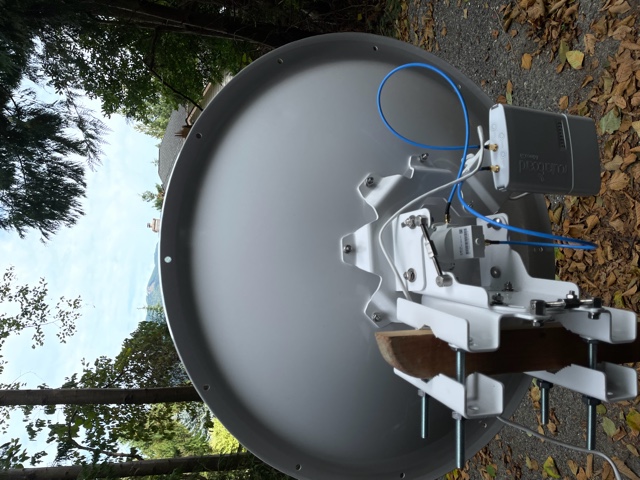
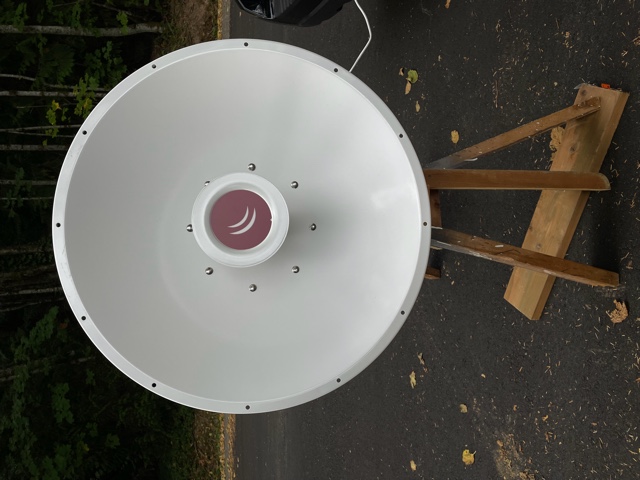
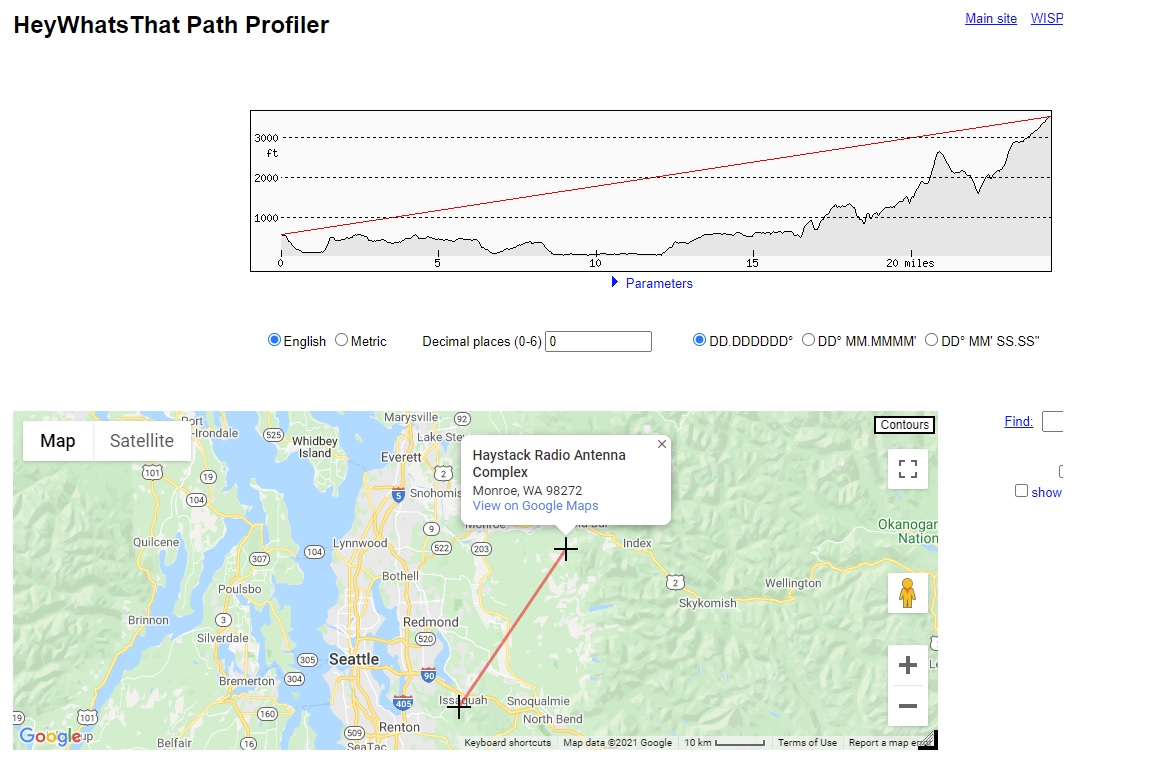
Bart: I finally figured out the hamwan map on the home page and found where the "Haystack Radio Antenna Complex" is located by zooming in. Strike my previous question on coordinates. I mapped out the path profile and it looks good. I'll have to wait till the rain clears up and the roof dries to see if I can reach it. Fingers crossed. On Sun, Sep 12, 2021 at 12:14 AM Paul Sundquist <psundquist@foxhill.org> wrote:
Haystack was my plan B when I ordered the equipment. I spent a lot of time looking towards Haystack with my binoculars and may have a clear shot from my roof. Visually it appears I can see the gap where Index, WA is located. I can see a valley by observing the mountains on the north side. Further in the distance I can see a glaciated mountain - potentially Glacier Peak.
Do you have the Haystack GPS coordinates? I’ll try aiming it at Haystack next.
Thanks for your advise. Didn’t expect to learn so much about the mountains visible from my house with this endeavor.
-Paul
On Sat, Sep 11, 2021 at 10:57 PM Bart Kus <me@bartk.us> wrote:
If your GPS data is correct, you may also want to try a shot to Haystack. It looks possibly unobstructed to you.
--Bart
On 9/11/2021 10:54 PM, Bart Kus wrote:
I'm not sure what's going wrong, but I can verify that S3.ETiger is running and has 5 clients connected to it. I suspect you might be aiming at the towers on west tiger (47.508761°, -121.984954°) and (47.504856°, -121.971615°) whereas the HamWAN site is on east tiger (47.488172°, -121.946733°). From your picture, you should see a 3rd tower or cluster of towers further towards the right, if that is the case. Google Earth is a good tool to get a sense of the visuals, since it lets you tilt the world.
--Bart
On 9/11/2021 4:58 PM, Paul Sundquist wrote:
New install on Squak Mountain Issaquah and unable to find any signal on Tiger Mountain. I’m 3.5 miles away west and a little north of the tower on Tiger. Clear line of sight. Please validate with the tower picture attached.
Installed the following: MikroTik mANT30 PA parabolic dish antenna 5GHz 30dBi MTAD-5G-30D3-PA Mikrotik BaseBox 5 RB912UAG-5HPnD-OUT 5GHz Outdoor Wireless AP Gigabit USB OSL4
Questions: Q1) Is the antenna tower on the right in the picture the right site? Q2) Is the dish assembled correctly? See picture. Q3) I was watching the signal strength on the routerboard while running "/interface wireless scan 0”. Nothing showed up on the terminal session and no signal strength LED’s lit up. I moved it left to right and adjusted azimuth each time I stopped. Q4) How long should you wait to acquire the signal between each time you move it? Q5) Is there anything like the signal strength tones aiming a DirecTV dish? Q6) Any other ideas. My exported configuration is below and I’ve successfully completed every step listed here: https://hamwan.org/Standards/Network%20Engineering/Client%20Node%20Configura... <https://hamwan.org/Standards/Network%0D%20%20%20%20%20%20%20%20%20%20%20%20%20%20Engineering/Client%20Node%20Configuration.html>
Thanks for your help! -Paul KK7AMW
[admin@KK7AMW-Issaquah] > export # sep/08/2021 16:57:46 by RouterOS 6.48.4 # software id = H1Z0-P9F3 # # model = 912UAG-5HPnD
/interface wireless set [ find default-name=wlan1 ] band=5ghz-onlyn country=no_country_set disabled=no frequency-mode=superchannel radio-name=KK7AMW/Issaquah-Tiger scan-list=HamWAN ssid=HamWAN \ wireless-protocol=nv2 /interface list add name=WAN add name=LAN /interface wireless channels add band=5ghz-onlyn comment="Cell sites radiate this at 0 degrees (north)" frequency=5920 list=HamWAN name=Sector1-5 width=5 add band=5ghz-onlyn comment="Cell sites radiate this at 120 degrees (south-east)" frequency=5900 list=HamWAN name=Sector2-5 width=5 add band=5ghz-onlyn comment="Cell sites radiate this at 240 degrees (south-west)" frequency=5880 list=HamWAN name=Sector3-5 width=5 add band=5ghz-onlyn comment="Cell sites radiate this at 0 degrees (north)" frequency=5920 list=HamWAN name=Sector1-10 width=10 add band=5ghz-onlyn comment="Cell sites radiate this at 120 degrees (south-east)" frequency=5900 list=HamWAN name=Sector2-10 width=10 add band=5ghz-onlyn comment="Cell sites radiate this at 240 degrees (south-west)" frequency=5880 list=HamWAN name=Sector3-10 width=10 /interface wireless security-profiles set [ find default=yes ] supplicant-identity=MikroTik /snmp community set [ find default=yes ] addresses=44.24.240.0/20 name=hamwan /system logging action set 3 remote=44.24.244.8 /interface list member add interface=wlan1 list=WAN add list=LAN /ip address add address=192.168.86.53/24 interface=ether1 network=192.168.86.0 /ip dhcp-client add disabled=no interface=wlan1 /ip dns set servers=192.168.86.9 /ip firewall mangle add action=change-mss chain=output new-mss=1378 protocol=tcp tcp-flags=syn tcp-mss=!0-1378 add action=change-mss chain=forward new-mss=1378 protocol=tcp tcp-flags=syn tcp-mss=!0-1378 /ip route add distance=1 gateway=192.168.86.1 /ip service set telnet disabled=yes set ftp disabled=yes set www disabled=yes set ssh port=222 set api disabled=yes set api-ssl disabled=yes /snmp set contact="#HamWAN-Support on irc.freenode.org" enabled=yes location=47.516944,-122.0452 /system clock set time-zone-name=America/Los_Angeles /system identity set name=KK7AMW-Issaquah /system logging add action=remote topics=info add action=remote topics=warning add action=remote topics=error /system ntp client set enabled=yes primary-ntp=44.24.244.4 secondary-ntp=44.24.245.4 /system routerboard settings set boot-device=try-ethernet-once-then-nand [admin@KK7AMW-Issaquah] >
_______________________________________________ PSDR mailing listPSDR@hamwan.orghttp://mail.hamwan.net/mailman/listinfo/psdr
_______________________________________________ PSDR mailing listPSDR@hamwan.orghttp://mail.hamwan.net/mailman/listinfo/psdr
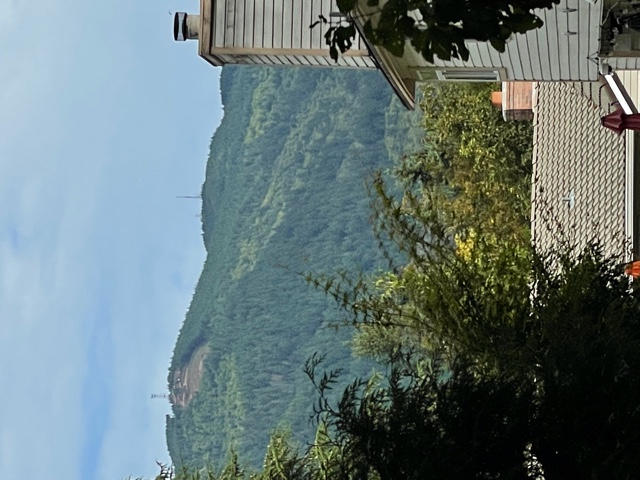
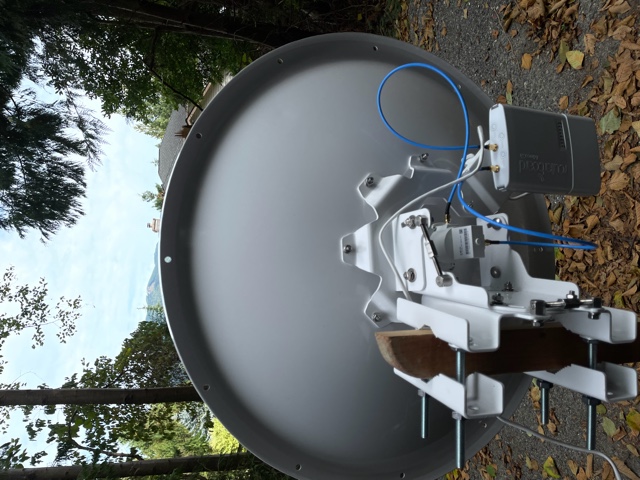
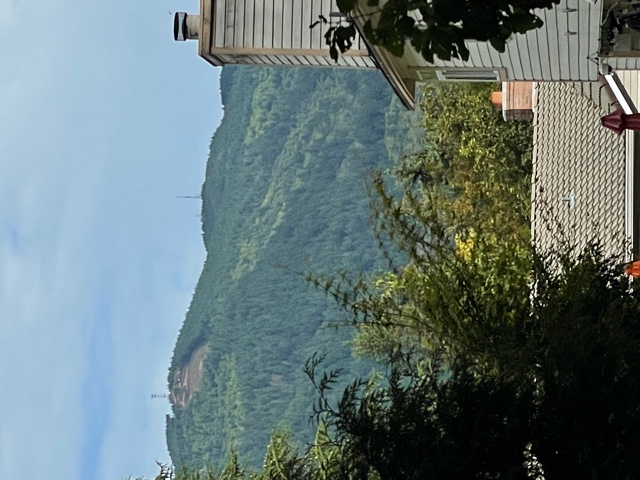
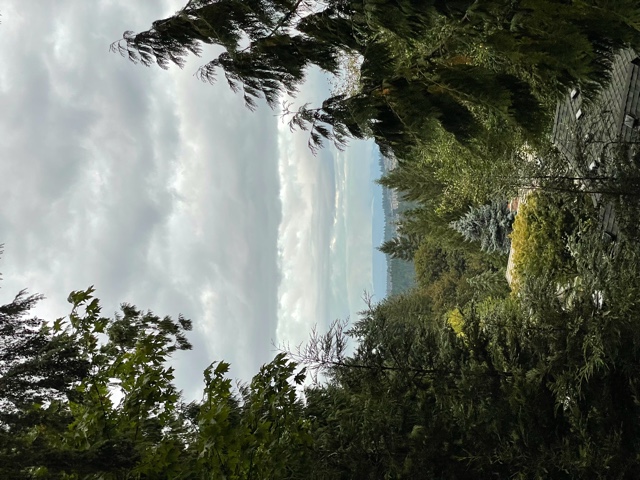
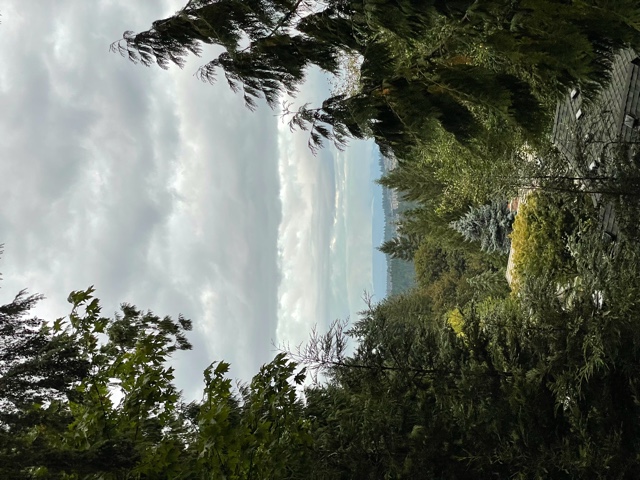
SUCCESS! Connected to Haystack, sig -79, NF -121, and SNR 42-44 during my first adjustment from 25 miles away. Thanks everyone for all for your help. I was surprised by the simplicity and how quick it was to aim. Glad the precision adjuster was on the recommended hardware since it make adjusting easy. I’m very lucky that I can see Haystack through the small unobstructed view through the trees. See attached picture. Now it’s time to explore HamWAN. -Paul KK7AMW
On Sep 12, 2021, at 9:50 AM, Paul Sundquist <psundquist@foxhill.org> wrote:
Bart:
I finally figured out the hamwan map on the home page and found where the "Haystack Radio Antenna Complex" is located by zooming in. Strike my previous question on coordinates.
I mapped out the path profile and it looks good. I'll have to wait till the rain clears up and the roof dries to see if I can reach it.
Fingers crossed.
On Sun, Sep 12, 2021 at 12:14 AM Paul Sundquist <psundquist@foxhill.org <mailto:psundquist@foxhill.org>> wrote: Haystack was my plan B when I ordered the equipment. I spent a lot of time looking towards Haystack with my binoculars and may have a clear shot from my roof. Visually it appears I can see the gap where Index, WA is located. I can see a valley by observing the mountains on the north side. Further in the distance I can see a glaciated mountain - potentially Glacier Peak.
Do you have the Haystack GPS coordinates? I’ll try aiming it at Haystack next.
Thanks for your advise. Didn’t expect to learn so much about the mountains visible from my house with this endeavor.
-Paul
On Sat, Sep 11, 2021 at 10:57 PM Bart Kus <me@bartk.us <mailto:me@bartk.us>> wrote: If your GPS data is correct, you may also want to try a shot to Haystack. It looks possibly unobstructed to you.
--Bart
On 9/11/2021 10:54 PM, Bart Kus wrote:
I'm not sure what's going wrong, but I can verify that S3.ETiger is running and has 5 clients connected to it. I suspect you might be aiming at the towers on west tiger (47.508761°, -121.984954°) and (47.504856°, -121.971615°) whereas the HamWAN site is on east tiger (47.488172°, -121.946733°). From your picture, you should see a 3rd tower or cluster of towers further towards the right, if that is the case. Google Earth is a good tool to get a sense of the visuals, since it lets you tilt the world.
--Bart
On 9/11/2021 4:58 PM, Paul Sundquist wrote:
New install on Squak Mountain Issaquah and unable to find any signal on Tiger Mountain. I’m 3.5 miles away west and a little north of the tower on Tiger. Clear line of sight. Please validate with the tower picture attached.
Installed the following: MikroTik mANT30 PA parabolic dish antenna 5GHz 30dBi MTAD-5G-30D3-PA Mikrotik BaseBox 5 RB912UAG-5HPnD-OUT 5GHz Outdoor Wireless AP Gigabit USB OSL4
Questions: Q1) Is the antenna tower on the right in the picture the right site? Q2) Is the dish assembled correctly? See picture. Q3) I was watching the signal strength on the routerboard while running "/interface wireless scan 0”. Nothing showed up on the terminal session and no signal strength LED’s lit up. I moved it left to right and adjusted azimuth each time I stopped. Q4) How long should you wait to acquire the signal between each time you move it? Q5) Is there anything like the signal strength tones aiming a DirecTV dish? Q6) Any other ideas. My exported configuration is below and I’ve successfully completed every step listed here: https://hamwan.org/Standards/Network%20Engineering/Client%20Node%20Configura... <https://hamwan.org/Standards/Network%0D%20%20%20%20%20%20%20%20%20%20%20%20%20%20Engineering/Client%20Node%20Configuration.html>
Thanks for your help! -Paul KK7AMW
[admin@KK7AMW-Issaquah] > export # sep/08/2021 16:57:46 by RouterOS 6.48.4 # software id = H1Z0-P9F3 # # model = 912UAG-5HPnD
/interface wireless set [ find default-name=wlan1 ] band=5ghz-onlyn country=no_country_set disabled=no frequency-mode=superchannel radio-name=KK7AMW/Issaquah-Tiger scan-list=HamWAN ssid=HamWAN \ wireless-protocol=nv2 /interface list add name=WAN add name=LAN /interface wireless channels add band=5ghz-onlyn comment="Cell sites radiate this at 0 degrees (north)" frequency=5920 list=HamWAN name=Sector1-5 width=5 add band=5ghz-onlyn comment="Cell sites radiate this at 120 degrees (south-east)" frequency=5900 list=HamWAN name=Sector2-5 width=5 add band=5ghz-onlyn comment="Cell sites radiate this at 240 degrees (south-west)" frequency=5880 list=HamWAN name=Sector3-5 width=5 add band=5ghz-onlyn comment="Cell sites radiate this at 0 degrees (north)" frequency=5920 list=HamWAN name=Sector1-10 width=10 add band=5ghz-onlyn comment="Cell sites radiate this at 120 degrees (south-east)" frequency=5900 list=HamWAN name=Sector2-10 width=10 add band=5ghz-onlyn comment="Cell sites radiate this at 240 degrees (south-west)" frequency=5880 list=HamWAN name=Sector3-10 width=10 /interface wireless security-profiles set [ find default=yes ] supplicant-identity=MikroTik /snmp community set [ find default=yes ] addresses=44.24.240.0/20 <http://44.24.240.0/20> name=hamwan /system logging action set 3 remote=44.24.244.8 /interface list member add interface=wlan1 list=WAN add list=LAN /ip address add address=192.168.86.53/24 <http://192.168.86.53/24> interface=ether1 network=192.168.86.0 /ip dhcp-client add disabled=no interface=wlan1 /ip dns set servers=192.168.86.9 /ip firewall mangle add action=change-mss chain=output new-mss=1378 protocol=tcp tcp-flags=syn tcp-mss=!0-1378 add action=change-mss chain=forward new-mss=1378 protocol=tcp tcp-flags=syn tcp-mss=!0-1378 /ip route add distance=1 gateway=192.168.86.1 /ip service set telnet disabled=yes set ftp disabled=yes set www disabled=yes set ssh port=222 set api disabled=yes set api-ssl disabled=yes /snmp set contact="#HamWAN-Support on irc.freenode.org <http://irc.freenode.org/>" enabled=yes location=47.516944,-122.0452 /system clock set time-zone-name=America/Los_Angeles /system identity set name=KK7AMW-Issaquah /system logging add action=remote topics=info add action=remote topics=warning add action=remote topics=error /system ntp client set enabled=yes primary-ntp=44.24.244.4 secondary-ntp=44.24.245.4 /system routerboard settings set boot-device=try-ethernet-once-then-nand [admin@KK7AMW-Issaquah] > <IMG_2932.jpeg> <IMG_2931.jpeg>
<IMG_2933.jpeg>
_______________________________________________ PSDR mailing list PSDR@hamwan.org <mailto:PSDR@hamwan.org> http://mail.hamwan.net/mailman/listinfo/psdr <http://mail.hamwan.net/mailman/listinfo/psdr>
_______________________________________________ PSDR mailing list PSDR@hamwan.org <mailto:PSDR@hamwan.org> http://mail.hamwan.net/mailman/listinfo/psdr <http://mail.hamwan.net/mailman/listinfo/psdr>
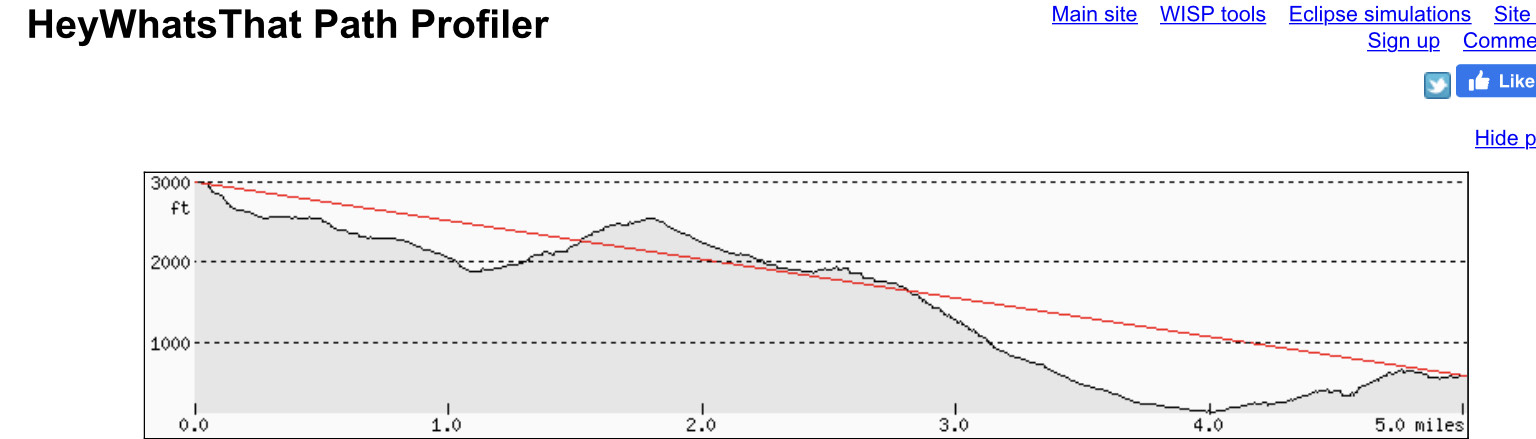
<elevationplothaystack.jpg>
Great to hear! And if you ever want more speed, it's a simple matter of just using a larger dish. Welcome aboard, have fun moving packets. :) --Bart On 9/12/2021 10:13 PM, Paul Sundquist wrote:
SUCCESS! Connected to Haystack, sig -79, NF -121, and SNR 42-44 during my first adjustment from 25 miles away.
Thanks everyone for all for your help. I was surprised by the simplicity and how quick it was to aim. Glad the precision adjuster was on the recommended hardware since it make adjusting easy.
I’m very lucky that I can see Haystack through the small unobstructed view through the trees. See attached picture.
Now it’s time to explore HamWAN.
-Paul KK7AMW
On Sep 12, 2021, at 9:50 AM, Paul Sundquist <psundquist@foxhill.org <mailto:psundquist@foxhill.org>> wrote:
Bart:
I finally figured out the hamwan map on the home page and found where the "Haystack Radio Antenna Complex" is located by zooming in. Strike my previous question on coordinates.
I mapped out the path profile and it looks good. I'll have to wait till the rain clears up and the roof dries to see if I can reach it.
Fingers crossed.
On Sun, Sep 12, 2021 at 12:14 AM Paul Sundquist <psundquist@foxhill.org <mailto:psundquist@foxhill.org>> wrote:
Haystack was my plan B when I ordered the equipment. I spent a lot of time looking towards Haystack with my binoculars and may have a clear shot from my roof. Visually it appears I can see the gap where Index, WA is located. I can see a valley by observing the mountains on the north side. Further in the distance I can see a glaciated mountain - potentially Glacier Peak.
Do you have the Haystack GPS coordinates? I’ll try aiming it at Haystack next.
Thanks for your advise. Didn’t expect to learn so much about the mountains visible from my house with this endeavor.
-Paul
On Sat, Sep 11, 2021 at 10:57 PM Bart Kus <me@bartk.us <mailto:me@bartk.us>> wrote:
If your GPS data is correct, you may also want to try a shot to Haystack. It looks possibly unobstructed to you.
--Bart
On 9/11/2021 10:54 PM, Bart Kus wrote:
I'm not sure what's going wrong, but I can verify that S3.ETiger is running and has 5 clients connected to it. I suspect you might be aiming at the towers on west tiger (47.508761°, -121.984954°) and (47.504856°, -121.971615°) whereas the HamWAN site is on east tiger (47.488172°, -121.946733°). From your picture, you should see a 3rd tower or cluster of towers further towards the right, if that is the case. Google Earth is a good tool to get a sense of the visuals, since it lets you tilt the world.
--Bart
On 9/11/2021 4:58 PM, Paul Sundquist wrote:
New install on Squak Mountain Issaquah and unable to find any signal on Tiger Mountain. I’m 3.5 miles away west and a little north of the tower on Tiger. Clear line of sight. Please validate with the tower picture attached.
Installed the following: MikroTik mANT30 PA parabolic dish antenna 5GHz 30dBi MTAD-5G-30D3-PA Mikrotik BaseBox 5 RB912UAG-5HPnD-OUT 5GHz Outdoor Wireless AP Gigabit USB OSL4
Questions: Q1) Is the antenna tower on the right in the picture the right site? Q2) Is the dish assembled correctly? See picture. Q3) I was watching the signal strength on the routerboard while running "/interface wireless scan 0”. Nothing showed up on the terminal session and no signal strength LED’s lit up. I moved it left to right and adjusted azimuth each time I stopped. Q4) How long should you wait to acquire the signal between each time you move it? Q5) Is there anything like the signal strength tones aiming a DirecTV dish? Q6) Any other ideas. My exported configuration is below and I’ve successfully completed every step listed here: https://hamwan.org/Standards/Network%20Engineering/Client%20Node%20Configura... <https://hamwan.org/Standards/Network%0D%20%20%20%20%20%20%20%20%20%20%20%20%20%20Engineering/Client%20Node%20Configuration.html>
Thanks for your help! -Paul KK7AMW
[admin@KK7AMW-Issaquah] > export # sep/08/2021 16:57:46 by RouterOS 6.48.4 # software id = H1Z0-P9F3 # # model = 912UAG-5HPnD
/interface wireless set [ find default-name=wlan1 ] band=5ghz-onlyn country=no_country_set disabled=no frequency-mode=superchannel radio-name=KK7AMW/Issaquah-Tiger scan-list=HamWAN ssid=HamWAN \ wireless-protocol=nv2 /interface list add name=WAN add name=LAN /interface wireless channels add band=5ghz-onlyn comment="Cell sites radiate this at 0 degrees (north)" frequency=5920 list=HamWAN name=Sector1-5 width=5 add band=5ghz-onlyn comment="Cell sites radiate this at 120 degrees (south-east)" frequency=5900 list=HamWAN name=Sector2-5 width=5 add band=5ghz-onlyn comment="Cell sites radiate this at 240 degrees (south-west)" frequency=5880 list=HamWAN name=Sector3-5 width=5 add band=5ghz-onlyn comment="Cell sites radiate this at 0 degrees (north)" frequency=5920 list=HamWAN name=Sector1-10 width=10 add band=5ghz-onlyn comment="Cell sites radiate this at 120 degrees (south-east)" frequency=5900 list=HamWAN name=Sector2-10 width=10 add band=5ghz-onlyn comment="Cell sites radiate this at 240 degrees (south-west)" frequency=5880 list=HamWAN name=Sector3-10 width=10 /interface wireless security-profiles set [ find default=yes ] supplicant-identity=MikroTik /snmp community set [ find default=yes ] addresses=44.24.240.0/20 <http://44.24.240.0/20> name=hamwan /system logging action set 3 remote=44.24.244.8 /interface list member add interface=wlan1 list=WAN add list=LAN /ip address add address=192.168.86.53/24 <http://192.168.86.53/24> interface=ether1 network=192.168.86.0 /ip dhcp-client add disabled=no interface=wlan1 /ip dns set servers=192.168.86.9 /ip firewall mangle add action=change-mss chain=output new-mss=1378 protocol=tcp tcp-flags=syn tcp-mss=!0-1378 add action=change-mss chain=forward new-mss=1378 protocol=tcp tcp-flags=syn tcp-mss=!0-1378 /ip route add distance=1 gateway=192.168.86.1 /ip service set telnet disabled=yes set ftp disabled=yes set www disabled=yes set ssh port=222 set api disabled=yes set api-ssl disabled=yes /snmp set contact="#HamWAN-Support on irc.freenode.org <http://irc.freenode.org/>" enabled=yes location=47.516944,-122.0452 /system clock set time-zone-name=America/Los_Angeles /system identity set name=KK7AMW-Issaquah /system logging add action=remote topics=info add action=remote topics=warning add action=remote topics=error /system ntp client set enabled=yes primary-ntp=44.24.244.4 secondary-ntp=44.24.245.4 /system routerboard settings set boot-device=try-ethernet-once-then-nand [admin@KK7AMW-Issaquah] > <IMG_2932.jpeg> <IMG_2931.jpeg>
<IMG_2933.jpeg>
_______________________________________________ PSDR mailing list PSDR@hamwan.org <mailto:PSDR@hamwan.org> http://mail.hamwan.net/mailman/listinfo/psdr <http://mail.hamwan.net/mailman/listinfo/psdr>
_______________________________________________ PSDR mailing list PSDR@hamwan.org <mailto:PSDR@hamwan.org> http://mail.hamwan.net/mailman/listinfo/psdr <http://mail.hamwan.net/mailman/listinfo/psdr>
<elevationplothaystack.jpg>
You are correct, I wrongly assumed the site was located in West Tiger. I attached a elevation plot from my house to east Tiger and some mountain might be in the way. BTW - I’m in a fringe area for the PNWDigital DMR East Tiger repeater. I’ll try the tilting the world trick on google earth, didn’t think of that. Left side of plot is east Tiger and I’m on the right side. On Sat, Sep 11, 2021 at 10:54 PM Bart Kus <me@bartk.us> wrote:
I'm not sure what's going wrong, but I can verify that S3.ETiger is running and has 5 clients connected to it. I suspect you might be aiming at the towers on west tiger (47.508761°, -121.984954°) and (47.504856°, -121.971615°) whereas the HamWAN site is on east tiger (47.488172°, -121.946733°). From your picture, you should see a 3rd tower or cluster of towers further towards the right, if that is the case. Google Earth is a good tool to get a sense of the visuals, since it lets you tilt the world.
--Bart
On 9/11/2021 4:58 PM, Paul Sundquist wrote:
New install on Squak Mountain Issaquah and unable to find any signal on Tiger Mountain. I’m 3.5 miles away west and a little north of the tower on Tiger. Clear line of sight. Please validate with the tower picture attached.
Installed the following: MikroTik mANT30 PA parabolic dish antenna 5GHz 30dBi MTAD-5G-30D3-PA Mikrotik BaseBox 5 RB912UAG-5HPnD-OUT 5GHz Outdoor Wireless AP Gigabit USB OSL4
Questions: Q1) Is the antenna tower on the right in the picture the right site? Q2) Is the dish assembled correctly? See picture. Q3) I was watching the signal strength on the routerboard while running "/interface wireless scan 0”. Nothing showed up on the terminal session and no signal strength LED’s lit up. I moved it left to right and adjusted azimuth each time I stopped. Q4) How long should you wait to acquire the signal between each time you move it? Q5) Is there anything like the signal strength tones aiming a DirecTV dish? Q6) Any other ideas. My exported configuration is below and I’ve successfully completed every step listed here: https://hamwan.org/Standards/Network%20Engineering/Client%20Node%20Configura... <https://hamwan.org/Standards/Network%0D%20%20%20%20%20%20%20%20%20%20%20%20Engineering/Client%20Node%20Configuration.html>
Thanks for your help! -Paul KK7AMW
[admin@KK7AMW-Issaquah] > export # sep/08/2021 16:57:46 by RouterOS 6.48.4 # software id = H1Z0-P9F3 # # model = 912UAG-5HPnD
/interface wireless set [ find default-name=wlan1 ] band=5ghz-onlyn country=no_country_set disabled=no frequency-mode=superchannel radio-name=KK7AMW/Issaquah-Tiger scan-list=HamWAN ssid=HamWAN \ wireless-protocol=nv2 /interface list add name=WAN add name=LAN /interface wireless channels add band=5ghz-onlyn comment="Cell sites radiate this at 0 degrees (north)" frequency=5920 list=HamWAN name=Sector1-5 width=5 add band=5ghz-onlyn comment="Cell sites radiate this at 120 degrees (south-east)" frequency=5900 list=HamWAN name=Sector2-5 width=5 add band=5ghz-onlyn comment="Cell sites radiate this at 240 degrees (south-west)" frequency=5880 list=HamWAN name=Sector3-5 width=5 add band=5ghz-onlyn comment="Cell sites radiate this at 0 degrees (north)" frequency=5920 list=HamWAN name=Sector1-10 width=10 add band=5ghz-onlyn comment="Cell sites radiate this at 120 degrees (south-east)" frequency=5900 list=HamWAN name=Sector2-10 width=10 add band=5ghz-onlyn comment="Cell sites radiate this at 240 degrees (south-west)" frequency=5880 list=HamWAN name=Sector3-10 width=10 /interface wireless security-profiles set [ find default=yes ] supplicant-identity=MikroTik /snmp community set [ find default=yes ] addresses=44.24.240.0/20 name=hamwan /system logging action set 3 remote=44.24.244.8 /interface list member add interface=wlan1 list=WAN add list=LAN /ip address add address=192.168.86.53/24 interface=ether1 network=192.168.86.0 /ip dhcp-client add disabled=no interface=wlan1 /ip dns set servers=192.168.86.9 /ip firewall mangle add action=change-mss chain=output new-mss=1378 protocol=tcp tcp-flags=syn tcp-mss=!0-1378 add action=change-mss chain=forward new-mss=1378 protocol=tcp tcp-flags=syn tcp-mss=!0-1378 /ip route add distance=1 gateway=192.168.86.1 /ip service set telnet disabled=yes set ftp disabled=yes set www disabled=yes set ssh port=222 set api disabled=yes set api-ssl disabled=yes /snmp set contact="#HamWAN-Support on irc.freenode.org" enabled=yes location=47.516944,-122.0452 /system clock set time-zone-name=America/Los_Angeles /system identity set name=KK7AMW-Issaquah /system logging add action=remote topics=info add action=remote topics=warning add action=remote topics=error /system ntp client set enabled=yes primary-ntp=44.24.244.4 secondary-ntp=44.24.245.4 /system routerboard settings set boot-device=try-ethernet-once-then-nand [admin@KK7AMW-Issaquah] >
_______________________________________________ PSDR mailing listPSDR@hamwan.orghttp://mail.hamwan.net/mailman/listinfo/psdr
participants (3)
-
 Bart Kus
 -
 Dylan Ambauen
 -
 Paul Sundquist